---
title: Installation
description: Install specs.md and select your development flow
---
## Prerequisites
- Node.js 18 or higher
- An AI coding tool (Claude Code, Cursor, GitHub Copilot, or Google Antigravity)
## Install specs.md
:::note
Always use npx to get the latest version. Do not install globally with npm.
:::
```bash
npx specsmd@latest install
```
## Select Your Flow
During installation, you'll be prompted to select a development flow:
```
? Select a development flow:
Simple - Spec generation only (requirements, design, tasks)
❯ FIRE - Adaptive execution, brownfield & monorepo ready
AI-DLC - Full methodology with DDD (comprehensive checkpoints)
```
| Flow | Best For | Agents |
|------|----------|--------|
| **Simple** | Quick specs, prototypes, handoff | 1 |
| **FIRE** | Adaptive execution, brownfield, monorepos | 3 |
| **AI-DLC** | Full traceability, comprehensive documentation | 4 |
:::info
**Not sure which flow?** Check out our [Choose Your Flow](/architecture/choose-flow) guide.
:::
The installer automatically detects your AI coding tools and sets up:
Specialized agents for your selected flow
Project guidelines and conventions
Easy agent invocation commands
## What Gets Installed
After installation, you'll see the following structure based on your selected flow:
**Simple Flow**
```
.specsmd/
├── manifest.yaml # Installation manifest
└── simple/ # Simple flow
└── agents/ # Single agent
specs/ # Your specs will go here
└── (feature folders)
```
**FIRE Flow**
```
.specsmd/
├── manifest.yaml # Installation manifest
└── fire/ # FIRE flow
├── agents/ # Orchestrator, Planner, Builder
└── skills/ # Agent capabilities
.specs-fire/ # Project artifacts
├── state.yaml # Central state tracking
├── standards/ # Project standards
├── intents/ # Intent documentation
├── runs/ # Run logs
└── walkthroughs/ # Generated documentation
```
**AI-DLC Flow**
```
.specsmd/
├── manifest.yaml # Installation manifest
└── aidlc/ # AI-DLC flow
├── agents/ # Master, Inception, Construction, Operations
├── skills/ # Agent capabilities
├── templates/ # Artifact templates
└── memory-bank.yaml # Memory bank schema
memory-bank/ # Project artifacts
├── standards/ # Project standards
├── intents/ # Intent documentation
└── bolts/ # Bolt tracking
```
## Tool-Specific Setup
**Claude Code**
Slash commands are installed in `.claude/commands/`. Type `/` to see available commands:
 **Simple Flow:**
- `/specsmd-agent`
**FIRE Flow:**
- `/specsmd-fire`
- `/specsmd-fire-planner`
- `/specsmd-fire-builder`
**AI-DLC Flow:**
- `/specsmd-master-agent`
- `/specsmd-inception-agent`
- `/specsmd-construction-agent`
- `/specsmd-operations-agent`
**Cursor**
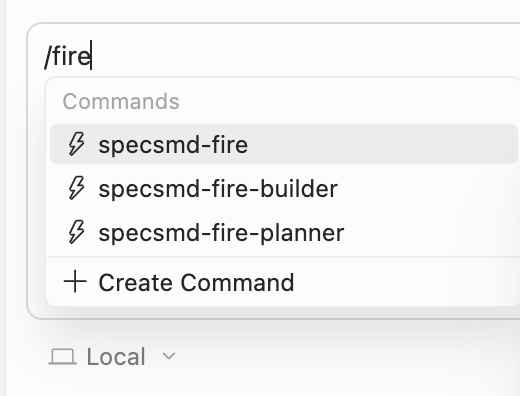
Commands are installed in `.cursor/commands/` as `.md` files. Invoke them by typing `/` followed by the command name:
**Simple Flow:**
- `/specsmd-agent`
**FIRE Flow:**
- `/specsmd-fire`
- `/specsmd-fire-planner`
- `/specsmd-fire-builder`
**AI-DLC Flow:**
- `/specsmd-master-agent`
- `/specsmd-inception-agent`
- `/specsmd-construction-agent`
- `/specsmd-operations-agent`
**Cursor**
Commands are installed in `.cursor/commands/` as `.md` files. Invoke them by typing `/` followed by the command name:
 **Simple Flow:**
- `/specsmd-agent`
**FIRE Flow:**
- `/specsmd-fire`
- `/specsmd-fire-planner`
- `/specsmd-fire-builder`
**AI-DLC Flow:**
- `/specsmd-master-agent`
- `/specsmd-inception-agent`
- `/specsmd-construction-agent`
- `/specsmd-operations-agent`
**GitHub Copilot**
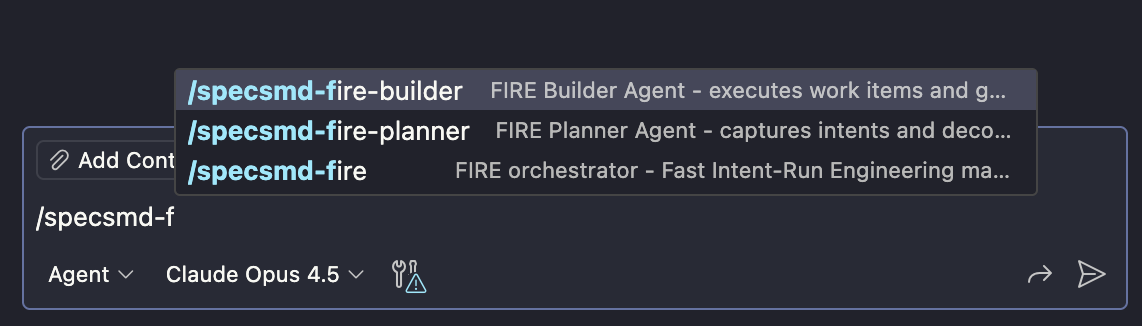
Agents are installed in `.github/agents/` using `.agent.md` format. Type `/` to see available commands:
**Simple Flow:**
- `/specsmd-agent`
**FIRE Flow:**
- `/specsmd-fire`
- `/specsmd-fire-planner`
- `/specsmd-fire-builder`
**AI-DLC Flow:**
- `/specsmd-master-agent`
- `/specsmd-inception-agent`
- `/specsmd-construction-agent`
- `/specsmd-operations-agent`
**GitHub Copilot**
Agents are installed in `.github/agents/` using `.agent.md` format. Type `/` to see available commands:
 **Simple Flow:**
- `/specsmd-agent`
**FIRE Flow:**
- `/specsmd-fire`
- `/specsmd-fire-planner`
- `/specsmd-fire-builder`
**AI-DLC Flow:**
- `/specsmd-master-agent`
- `/specsmd-inception-agent`
- `/specsmd-construction-agent`
- `/specsmd-operations-agent`
**Google Antigravity**
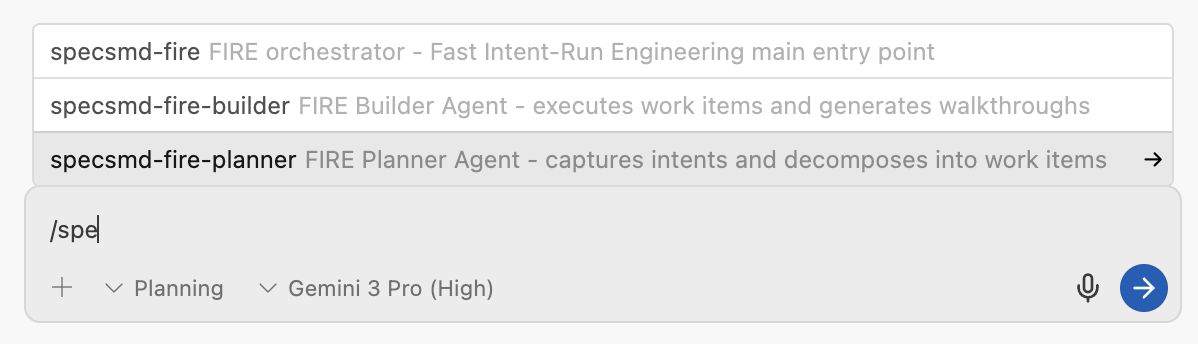
Workflows are installed in `.agent/workflows/` as `.md` files. Type `/` to see available commands:
**Simple Flow:**
- `/specsmd-agent`
**FIRE Flow:**
- `/specsmd-fire`
- `/specsmd-fire-planner`
- `/specsmd-fire-builder`
**AI-DLC Flow:**
- `/specsmd-master-agent`
- `/specsmd-inception-agent`
- `/specsmd-construction-agent`
- `/specsmd-operations-agent`
**Google Antigravity**
Workflows are installed in `.agent/workflows/` as `.md` files. Type `/` to see available commands:
 **Simple Flow:**
- `/specsmd-agent`
**FIRE Flow:**
- `/specsmd-fire`
- `/specsmd-fire-planner`
- `/specsmd-fire-builder`
**AI-DLC Flow:**
- `/specsmd-master-agent`
- `/specsmd-inception-agent`
- `/specsmd-construction-agent`
- `/specsmd-operations-agent`
## Next Steps
Generate specs in minutes
Ship your first feature fast
Full methodology walkthrough
**Simple Flow:**
- `/specsmd-agent`
**FIRE Flow:**
- `/specsmd-fire`
- `/specsmd-fire-planner`
- `/specsmd-fire-builder`
**AI-DLC Flow:**
- `/specsmd-master-agent`
- `/specsmd-inception-agent`
- `/specsmd-construction-agent`
- `/specsmd-operations-agent`
## Next Steps
Generate specs in minutes
Ship your first feature fast
Full methodology walkthrough