---
title: Introduction
description: AI-native development framework with four flows for every use case
---
 :::info
**Looking for the unified bolt flow?** That is [specsmd v2](/v2) — intents, work items, and dynamic bolts under `docs/specsmd/`. These pages document the legacy flows and keep every existing URL. Switch versions from the version menu, the **v2** navbar link, or that home page.
:::
## What is specs.md?
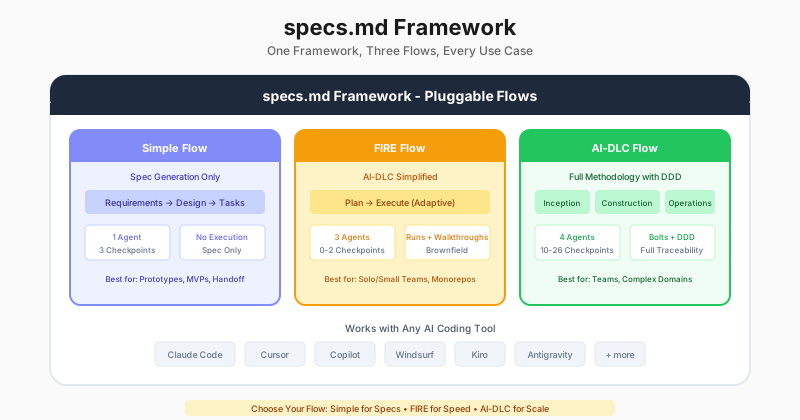
**specs.md** is an AI-native development framework with pluggable flows for every use case. Choose the flow that matches your project needs:
**Creative brainstorming**. Spark → Flame → Forge ideas into concept briefs.
**Spec generation only**. Quick requirements, design, and task documents.
**Adaptive execution**. Right-sizes the rigor, brownfield & monorepo ready.
**Full methodology**. Complete lifecycle with DDD and 4 agents.
:::info
**Not sure which flow?** Check out our [Choose Your Flow](/architecture/choose-flow) guide for a detailed comparison.
:::
## Quick Start
Install specs.md and select your flow
Track progress with the VS Code extension
## Framework Architecture
specs.md is built as a **pluggable framework** where development methodologies are implemented as **flows**:
```
specs.md (Framework)
├── Core (Standards, Agents, State)
└── Flows/
├── ideation/ ← Creative brainstorming (Spark → Flame → Forge)
├── simple/ ← Spec generation only
├── fire/ ← Rapid execution (0-2 checkpoints)
└── aidlc/ ← Full methodology with DDD
```
## Key Features
**Ideation** for creative brainstorming, **Simple** for quick specs, **FIRE** for rapid execution, **AI-DLC** for full methodology. Choose based on your project needs.
Spark → Flame → Forge. AI generates diverse ideas using 12 domains, evaluates them through multiple lenses, then shapes top picks into polished concept briefs—before you commit to writing specs.
FIRE flow adapts oversight to complexity: 0 checkpoints for simple tasks, 1 for standard features, 2 for critical changes.
Auto-detects existing patterns, respects conventions, and extends rather than rewrites your codebase.
Hierarchical standards with module-specific overrides. One project, multiple tech stacks.
Domain-Driven Design is integral to AI-DLC Construction phase for complex domains.
Works with Claude Code, Cursor, GitHub Copilot, and other AI coding assistants. Markdown-based agents work anywhere.
Track your progress with our [sidebar extension](/getting-started/ide-extension) for VS Code, Cursor, and Windsurf. Monitor progress, browse specs, and view project metrics visually.
## Flow Comparison
| Aspect | Ideation | Simple | FIRE | AI-DLC |
|--------|----------|--------|------|--------|
| **Optimized For** | Creative exploration | Spec generation | Adaptive execution | Full traceability |
| **Checkpoints** | 0 (non-blocking) | 3 (phase gates) | Adaptive (complexity + config) | Comprehensive |
| **Agents** | 1 | 1 | 3 | 4 |
| **Execution Tracking** | No | No | Yes | Yes |
| **Design Docs** | Concept briefs | Basic | When complexity warrants | DDD or Simple bolt |
| **Monorepo** | No | No | First-class | Limited |
## Supported Tools
specs.md is **IDE and AI-agnostic**—you choose your tools, no vendor lock-in.
Slash commands
Rules integration
Agents support
Rules integration
Rules integration
Rules integration
Agents support
Agents support
Agents support
Agents support
Agents support
:::info
Unlike tools that lock you into a specific paid IDE, specs.md works with **any AI coding tool**. Your specs and agents are portable markdown files that work everywhere.
:::
## Get Started
1. **Install specs.md**
```bash
npx specsmd@latest install
```
2. **Select your flow**
Choose **Ideation**, **Simple**, **FIRE**, or **AI-DLC** based on your project needs
3. **Start building**
Invoke your flow's agent and describe what you want to build
## Why specs.md?
Traditional development methods were built for human-driven, long-running processes. **specs.md reimagines the development lifecycle** with AI as a central collaborator:
- **Choose your overhead**: From creative brainstorming (Ideation) and no execution tracking (Simple) to full methodology (AI-DLC)
- **Start before specs**: Ideation explores the solution space and produces concept briefs—before you commit to writing requirements
- **Adaptive checkpoints**: FIRE adapts oversight to complexity—skip ceremony for simple tasks
- **Brownfield-first**: FIRE auto-detects existing patterns and conventions
- **Persistent context**: AI can reference across sessions with structured artifacts
- **Rapid cycles**: Ship features in hours, not weeks
:::info
**Featured on Product Hunt!** Check out our launch and leave a review: [specs.md on Product Hunt →](https://www.producthunt.com/products/specs-md)
:::
:::info
**Looking for the unified bolt flow?** That is [specsmd v2](/v2) — intents, work items, and dynamic bolts under `docs/specsmd/`. These pages document the legacy flows and keep every existing URL. Switch versions from the version menu, the **v2** navbar link, or that home page.
:::
## What is specs.md?
**specs.md** is an AI-native development framework with pluggable flows for every use case. Choose the flow that matches your project needs:
**Creative brainstorming**. Spark → Flame → Forge ideas into concept briefs.
**Spec generation only**. Quick requirements, design, and task documents.
**Adaptive execution**. Right-sizes the rigor, brownfield & monorepo ready.
**Full methodology**. Complete lifecycle with DDD and 4 agents.
:::info
**Not sure which flow?** Check out our [Choose Your Flow](/architecture/choose-flow) guide for a detailed comparison.
:::
## Quick Start
Install specs.md and select your flow
Track progress with the VS Code extension
## Framework Architecture
specs.md is built as a **pluggable framework** where development methodologies are implemented as **flows**:
```
specs.md (Framework)
├── Core (Standards, Agents, State)
└── Flows/
├── ideation/ ← Creative brainstorming (Spark → Flame → Forge)
├── simple/ ← Spec generation only
├── fire/ ← Rapid execution (0-2 checkpoints)
└── aidlc/ ← Full methodology with DDD
```
## Key Features
**Ideation** for creative brainstorming, **Simple** for quick specs, **FIRE** for rapid execution, **AI-DLC** for full methodology. Choose based on your project needs.
Spark → Flame → Forge. AI generates diverse ideas using 12 domains, evaluates them through multiple lenses, then shapes top picks into polished concept briefs—before you commit to writing specs.
FIRE flow adapts oversight to complexity: 0 checkpoints for simple tasks, 1 for standard features, 2 for critical changes.
Auto-detects existing patterns, respects conventions, and extends rather than rewrites your codebase.
Hierarchical standards with module-specific overrides. One project, multiple tech stacks.
Domain-Driven Design is integral to AI-DLC Construction phase for complex domains.
Works with Claude Code, Cursor, GitHub Copilot, and other AI coding assistants. Markdown-based agents work anywhere.
Track your progress with our [sidebar extension](/getting-started/ide-extension) for VS Code, Cursor, and Windsurf. Monitor progress, browse specs, and view project metrics visually.
## Flow Comparison
| Aspect | Ideation | Simple | FIRE | AI-DLC |
|--------|----------|--------|------|--------|
| **Optimized For** | Creative exploration | Spec generation | Adaptive execution | Full traceability |
| **Checkpoints** | 0 (non-blocking) | 3 (phase gates) | Adaptive (complexity + config) | Comprehensive |
| **Agents** | 1 | 1 | 3 | 4 |
| **Execution Tracking** | No | No | Yes | Yes |
| **Design Docs** | Concept briefs | Basic | When complexity warrants | DDD or Simple bolt |
| **Monorepo** | No | No | First-class | Limited |
## Supported Tools
specs.md is **IDE and AI-agnostic**—you choose your tools, no vendor lock-in.
Slash commands
Rules integration
Agents support
Rules integration
Rules integration
Rules integration
Agents support
Agents support
Agents support
Agents support
Agents support
:::info
Unlike tools that lock you into a specific paid IDE, specs.md works with **any AI coding tool**. Your specs and agents are portable markdown files that work everywhere.
:::
## Get Started
1. **Install specs.md**
```bash
npx specsmd@latest install
```
2. **Select your flow**
Choose **Ideation**, **Simple**, **FIRE**, or **AI-DLC** based on your project needs
3. **Start building**
Invoke your flow's agent and describe what you want to build
## Why specs.md?
Traditional development methods were built for human-driven, long-running processes. **specs.md reimagines the development lifecycle** with AI as a central collaborator:
- **Choose your overhead**: From creative brainstorming (Ideation) and no execution tracking (Simple) to full methodology (AI-DLC)
- **Start before specs**: Ideation explores the solution space and produces concept briefs—before you commit to writing requirements
- **Adaptive checkpoints**: FIRE adapts oversight to complexity—skip ceremony for simple tasks
- **Brownfield-first**: FIRE auto-detects existing patterns and conventions
- **Persistent context**: AI can reference across sessions with structured artifacts
- **Rapid cycles**: Ship features in hours, not weeks
:::info
**Featured on Product Hunt!** Check out our launch and leave a review: [specs.md on Product Hunt →](https://www.producthunt.com/products/specs-md)
:::