
Changelog
February 22, 2026
FIRE
Changed
- Added CLI worktree support so you can monitor and switch between multiple branches/worktrees in one place (useful when parallel feature branches are active and you want to track progress without leaving the dashboard)
- Added explicit command-log feedback after switching worktrees so the active context change is immediately visible (for example:
Switched to worktree: <name>)
February 21, 2026
FIRE
Added
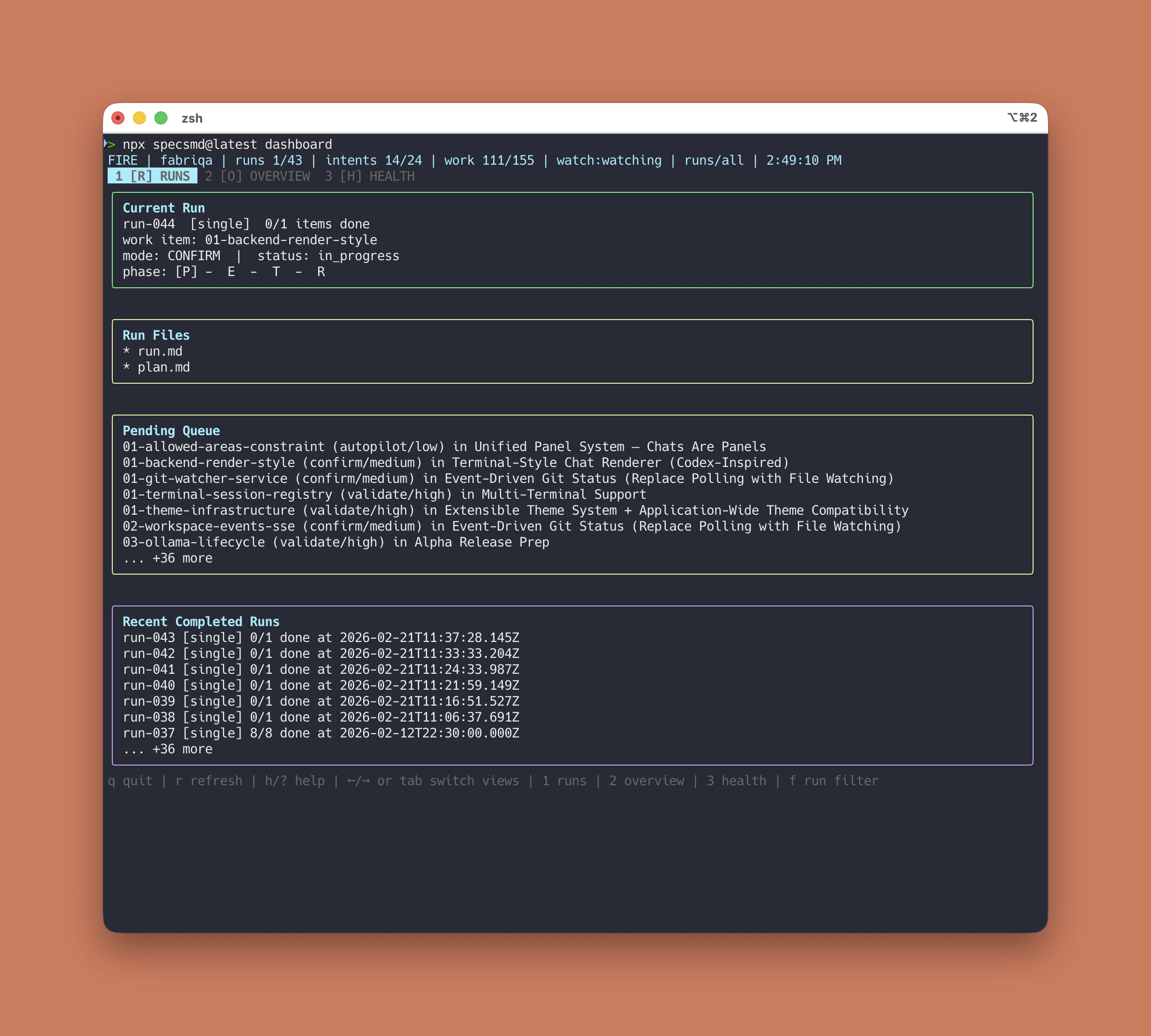
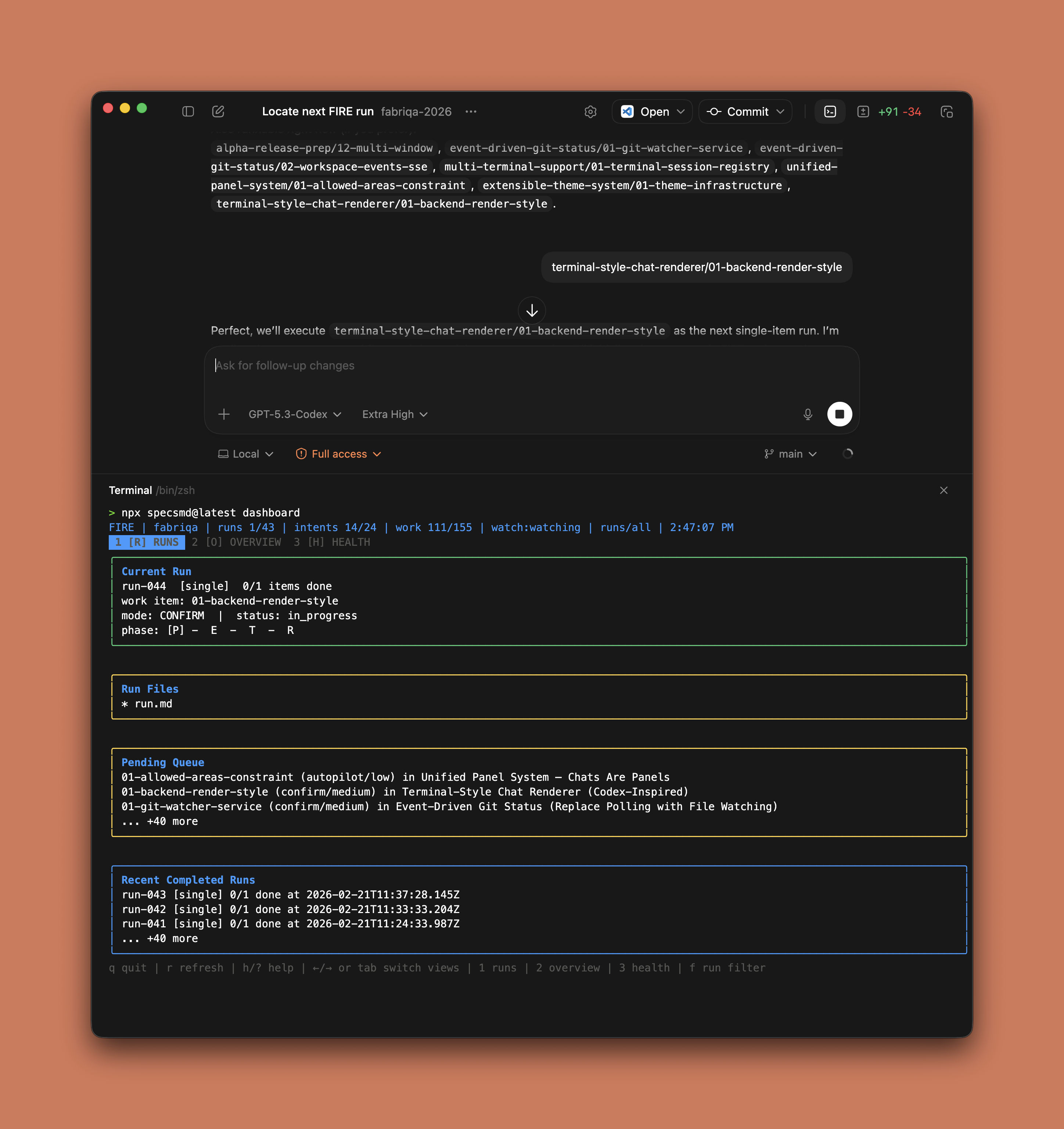
- New FIRE CLI dashboard command:
npx specsmd@latest dashboard - Tabbed terminal views: Runs, Overview, and Health (stats + warnings)
- Keyboard shortcuts for quick navigation:
1/2/3,Tab,←/→, andf - Current Run-first layout with phase track and run files panel
Changed
- Dashboard UX now targets CLI-first users and Codex desktop app workflows as a practical alternative to the VS Code extension
- Reduced flicker by limiting unnecessary UI updates and using calmer fallback refresh behavior
- Compact rendering for smaller terminal windows with tighter spacing and stricter height budgeting
- Nerd Font icon auto-detection (with override via
SPECSMD_ICON_SET=auto|nerd|ascii)
February 13, 2026
Codex
Fixed
- Codex installer now creates proper skills instead of flat
.mdfiles that Codex cannot read - Commands are transformed into
.codex/skills/<name>/SKILL.mdwith proper YAML frontmatter
January 25, 2026
FIRE
Per-Work-Item Phase Tracking
The VS Code extension now shows real-time phase progress for each work item in FIRE runs. Track exactly where your AI agent is in the Plan → Execute → Test → Review pipeline.
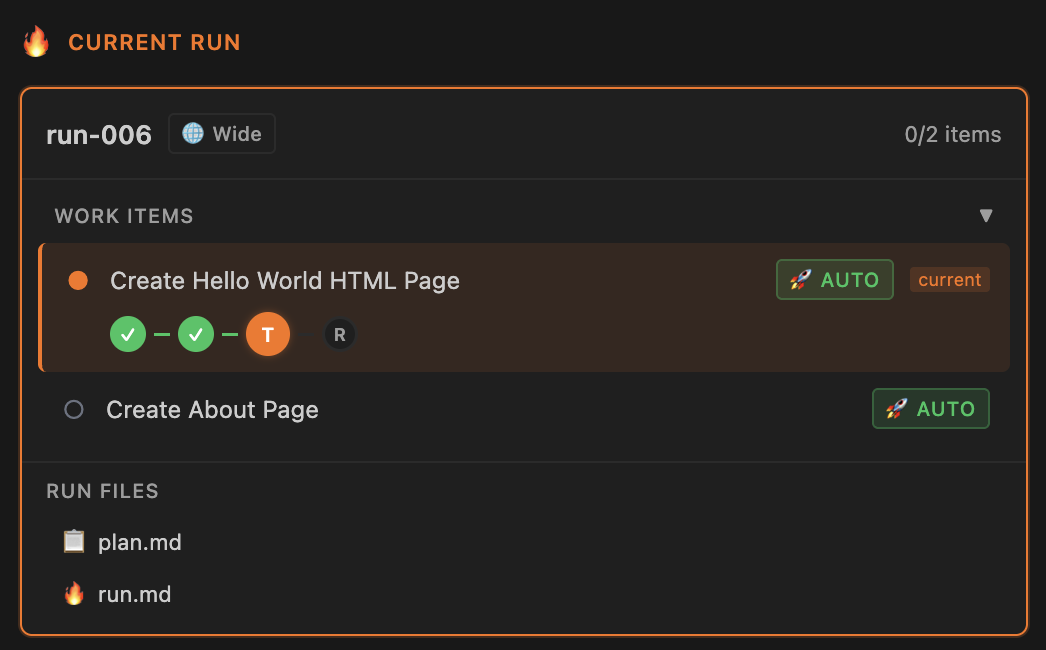
First work item in Test phase - completed Plan and Execute, now running tests.
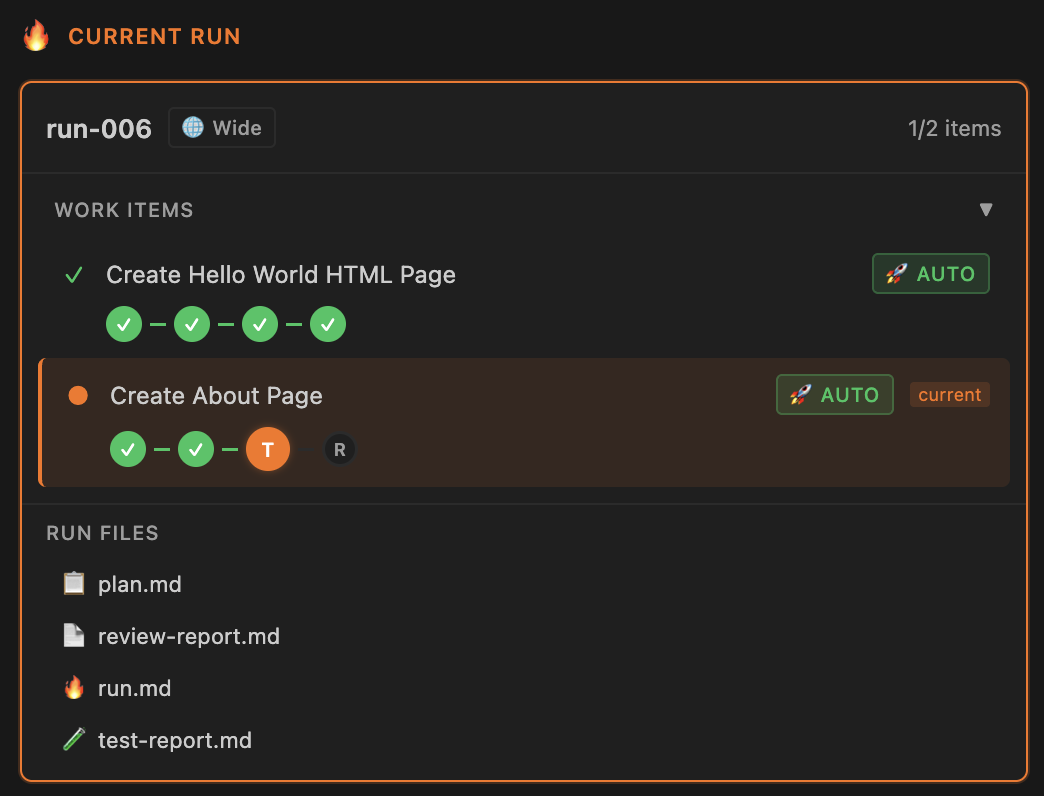
Progress through multiple work items - first item completed all phases, second item now in Test phase.
Added
- Per-work-item phase tracking in FIRE flow (Plan → Execute → Test → Review)
- Real-time phase progress indicator showing which phase each work item is currently in
- Visual distinction between completed phases (green checkmarks) and active phase (orange highlight)
Changed
- Phase tracking now updates at work item level instead of run level for better granularity
January 24, 2026
FIRE
Added
- FIRE: Status skill now includes comprehensive integrity validation with 14 issue types
- FIRE: Code verification option to check codebase when work item status is ambiguous
- FIRE: Maintenance log (
maintenance-log.md) for tracking all automated fixes - FIRE: Support for multiple parallel active runs in state schema
Changed
- FIRE: Status skill bumped to v2.0.0 with full validation workflow
- FIRE: All command references now use
/specsmd-fireprefix consistently - FIRE: Config references updated from
fire-config.yamltomemory-bank.yaml
Fixed
- FIRE: Added missing
review-report.mdto run artifacts schema - FIRE: Added missing
design-docpath to schema - FIRE: Added
blockedstatus to work item status values - FIRE: Added
modeanddepends_onfields to work item schema - FIRE: Orchestrator agent state example now matches actual schema structure
January 23, 2026
FIRE
Added
- FIRE Flow: New flow type with 17 Lit web components for VS Code extension
- VS Code: Flow switcher in toolbar for switching between AI-DLC and FIRE flows
- VS Code: FIRE Runs tab with active run display and completed runs history
- VS Code: FIRE Intents tab with expandable intent cards and progress tracking
- VS Code: Pending work items grouped by intent with dependency visualization
- VS Code: File watcher for
.specs-firedirectory to auto-refresh on state changes - VS Code: Expandable completed runs showing all markdown files with click-to-open
Changed
- File watcher now monitors both
memory-bankand.specs-firedirectories
Fixed
- YAML parsing now supports both snake_case and camelCase field names
- Intent expansion state persisted correctly across view refreshes
January 13, 2026
Simple Flow
Added
- Simple Flow: Lightweight 3-phase workflow (Requirements → Design → Tasks)
- Simple Flow documentation pages
- Changelog page in documentation
- Kiro installer with specs symlink support for Simple Flow
Changed
- Clarified Simple Flow and AI-DLC as independent flows (not an upgrade path)
Fixed
- Markdown lint errors in DDD construction bolt template
January 10, 2026
VS Code
January 10, 2026
Fix
Fixed
- OpenCode installer now uses correct command directory and frontmatter
January 9, 2026
VS Code
Added
- VS Code: Construction log display for completed bolts
- VS Code: Analytics module with lifecycle, engagement, and project metrics tracking
- VS Code: Open VSX marketplace publishing (works with Cursor, Windsurf, etc.)
- VS Code: Enhanced logs inception artifacts
Changed
- Moved scripts into aidlc flow folder for better organization
Fixed
- Test paths after scripts reorganization
January 6, 2026
Docs
Added
- Contextual options menu (copy, AI tools, feature request)
- DeepWiki integration for codebase exploration
- Workflow descriptions for Google Antigravity navigation
- SEO metadata and social sharing tags to docs
- Product Hunt launch integration
December 30, 2025
VS Code
Added
- Artifacts display in active bolt view
- Manual workflow dispatch trigger for releases
- Dev branch auto-publish workflow
Fixed
- Bolt-start guardrails to prevent skipping story updates
- Active bolt UI improvements and IDE-agnostic messages
- Frontmatter validation for bolt creation
- Geolocation in Mixpanel analytics tracker
December 28, 2025
Fix
Fixed
- Analytics events now properly sent before process exit
December 27, 2025
Release
Initial Release
- AI-DLC Flow with 4 agents (Master, Inception, Construction, Operations)
- Memory Bank for persistent project context
- Support for Claude Code, Cursor, GitHub Copilot, and other AI coding tools
- DDD construction bolt type
- Installer with automatic tool detection
December 27, 2025
VS Code